Testing Rumbling for a Bold Web Design Project
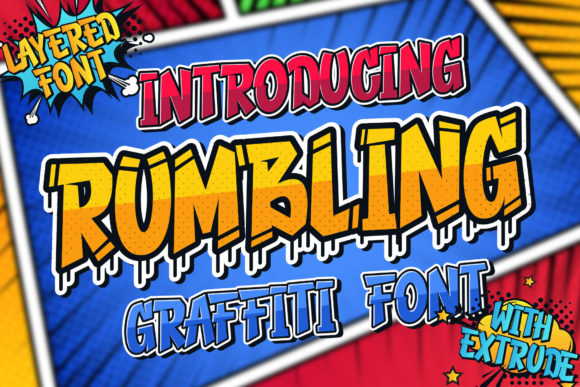
I was working on a redesign for a creative portfolio site last week, and I needed a font that would stand out but still feel modern. That’s when I stumbled upon Rumbling, a display font with a chunky, graffiti-inspired look. It immediately caught my eye because of its bold letterforms and playful energy.
As a web designer, I know the right typeface can make or break a design. Rumbling has a distinct personality — it feels urban, edgy, and slightly rebellious. The thick strokes and irregular shapes give it a hand-painted vibe that’s perfect for creative brands looking to stand out from the crowd.
First Impressions: A Hero Section Test
I decided to test Rumbling in the hero section of the portfolio site. The client wanted their name to be the focal point, and I thought this font would add just the right amount of visual interest without overwhelming the layout. I placed it over a dark background with a subtle image overlay and saw how well it contrasted against the color.
The font looked great in large sizes, especially when paired with a clean sans-serif body text like Helvetica Neue. This combination gave the page a balanced feel — the bold headline drew attention, while the simpler body text made reading easy.
Readability and Responsiveness
One thing I always check is how a font performs on mobile screens. Rumbling worked surprisingly well in smaller sizes, though I had to adjust the line height and spacing to maintain readability. I found that keeping it to short phrases or titles helped preserve clarity, which makes sense since it’s a display font.
For buttons and call-to-action areas, I opted for a more straightforward sans-serif typeface instead. Rumbling felt too heavy for interactive elements, but it shone as a decorative accent or headline.
Using Rumbling Across Different Sections
After testing the hero section, I started experimenting with other parts of the site. Rumbling worked beautifully in section headings, especially on a blog header where it added a touch of personality to the title. I also used it for a campaign landing page where the brand wanted to convey a sense of street culture and creativity.
In an online store context, Rumbling could be used for product banners or promotional headlines. It gives a fresh, modern look that appeals to younger audiences. However, I’d avoid using it for long paragraphs or navigation menus, as it might hinder readability.
Font Pairing and Brand Identity
When building a digital brand identity, font pairing is crucial. Rumbling pairs well with minimalist fonts like Open Sans or Lato for body copy. This mix allows the bold display font to take center stage while ensuring the rest of the content remains accessible and easy to read.
I also noticed that Rumbling fits well within editorial designs or social media graphics where a more artistic approach is desired. Its unique character adds a layer of visual storytelling that can elevate a brand’s overall aesthetic.
Practical Considerations for Web Use
Before implementing any font on a live website, I always check for webfont availability, file formats, and licensing. Rumbling offers several styles and weights, making it versatile for different use cases. It supports multiple languages, which is a plus if the project requires international reach.
For performance, I used a font loading strategy that prioritized the most important text elements first. This ensures the page loads quickly even with custom fonts. Also, I made sure to optimize the font files by using only the necessary subsets and weights to keep the site fast and responsive.
Finally, I tested the font across various screen sizes and devices to ensure it maintained its legibility and visual appeal. Rumbling held up well in all scenarios, which made me confident in choosing it for the final design.
Overall, Rumbling brought a fresh, modern energy to the project. It’s not a font for every brand, but for those looking to inject some attitude into their web design, it’s definitely worth considering. Whether it's for a creative portfolio, boutique store, or a course landing page, Rumbling can help make a strong visual statement without sacrificing usability or accessibility.